

Most websites soon need more than Posts and Pages. A joiner wants a Projects section with the client, the location, the finish and a gallery of photos. A dental practice wants Team members with job titles and qualifications. Usually that means two plugins: one for post types and one for custom fields. NR Types & Fields does both in one lightweight plugin with a plain-English screen.
Type “Project” and it works out “Projects”, the key, the web address and every menu label for you. Pick an icon from the full WordPress icon set, choose what the editor shows, and press Save. Your new Projects menu appears straight away. Add your own taxonomies, such as Project type or Area, in the same way.
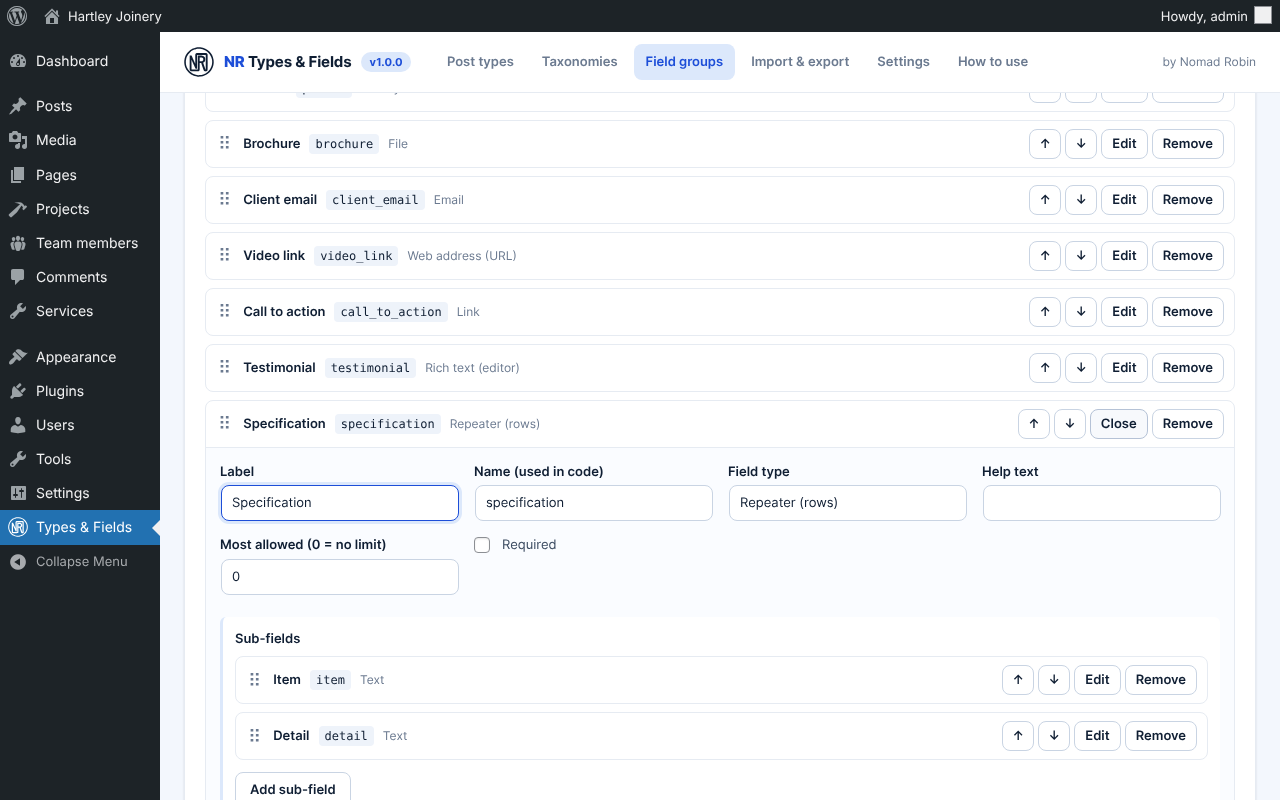
Then build a field group: a box of extra fields that appears when you edit that content. There are 19 field types, from text, dates and drop-down lists to images, galleries, related posts, links, a rich text editor, groups and repeaters whose rows you can drag into order. Choose where each box appears by post type, page template or category, and mark fields as required.
Showing the values is just as easy. Add the Field block in the block editor or Site Editor (it works inside a Query Loop, so every card in a list shows its own details), use the [nr_field] shortcode, or one line of theme code. Dates appear in UK format by default, galleries and lists come out tidy, and everything is escaped for safety.
Your content stays yours. Every value is saved as normal WordPress post meta and appears in the REST API, so it is never locked into the plugin. Removing a post type, taxonomy or field group never deletes anything: it goes to a restore list with your content intact. You can export your whole set-up as JSON for another site, or as PHP code for your theme.
Made by Nomad Robin, with a plain-English “How to use” screen built in.
Key features
- Custom post types, taxonomies and custom fields in one plugin
- Post type labels made automatically from the singular and plural names
- Key and web address filled in for you
- Searchable icon picker with every WordPress Dashicon
- Choose what the editor shows: title, editor, featured image, excerpt, author, comments, revisions, order and parent
- Archive page, custom archive address, parent items, menu position and site search options
- Block editor and REST API support with one tick
- Custom taxonomies, category-style or tag-style, attached to any post types
- Optional taxonomy column in the posts list
- Field groups shown by post type, page template or category / term
- Match all rules or any rule, with is / is not
- Field box under the editor or in the sidebar
- 19 field types
- Text, text area, number, email and web address fields
- Drop-down list, tick boxes, radio buttons and yes / no fields
- Date field with UK date format by default
- Colour field with picker
- Image, file and gallery fields using the Media Library
- Related posts field with live search and a limit
- Link field with link text and open-in-new-tab option
- Rich text editor field
- Repeater field with rows you can add, remove and drag into order
- Group field for related sub-fields
- Required fields block saving until filled in
- Default values and placeholders
- Field builder with drag-and-drop and keyboard-friendly up / down buttons
- Values saved as normal post meta, so your content stays portable
- Values registered with WordPress and shown in the REST API
- Field block for the block editor and Site Editor
- Field block works inside a Query Loop
- [nr_field] shortcode with optional label and post ID
- nr_field() and nr_get_field() theme functions
- Images, galleries, links, dates and lists displayed tidily and safely
- Export everything as JSON
- Export ready-to-paste PHP code
- Import from JSON
- Removing a post type, taxonomy or field group never deletes content
- Restore list for removed items
- Warning with the number of items before anything is removed
- Nothing loaded on your website except a tiny optional stylesheet where a field is shown
- No jQuery on the front end
- Built-in "How to use" tab in plain English
- Version number shown on the plugin's screen
- Works on phones and tablets
- Translation-ready
- Keeps your data when uninstalled unless you choose otherwise
- One price: use it on as many sites as you like
Screenshots


Details and requirements
| Version | 1.0.0 |
|---|---|
| Last updated | 27 October 2026 |
| Download size | 69 KB |
| Licence | GPL v2 or later (code) |
Changelog
- 1.0.0 27 Oct 2026 — First release
Questions
How do I get the plugin after paying?
Straight away: there's a download button on the thank-you page, and you'll get an email with your personal download link and licence key.
How do updates work?
Your download link always gives you the latest release of version 1: fixes, security updates and small improvements are included. A future version 2 would be a separate purchase, and you never have to upgrade.
Can I use it on more than one site?
Yes. One price, and you can use it on as many sites as you like.
Is support included?
No. Help, set-up and customisation aren't included in the price. If something doesn't work as described, report it through the support page and I'll put it right. Your legal rights are not affected.
Can I get a refund?
Your legal rights apply if the product is faulty or not as described, and if it doesn't work as described and I can't fix it, I'll refund you. Because it's a download, the usual 14-day change-of-mind right ends once you start the download. Full details are in the Digital Products Terms.
Prices in pounds. I'm not VAT registered, so no VAT is added. Digital Products Terms