

Most cookie banners look the part but still let Google Analytics and the Meta Pixel set cookies before anyone says yes. That is exactly what the ICO warns businesses about. NR Cookie Consent blocks tracking for real: well-known scripts are switched off in the page before it reaches the visitor, and only switched on for the categories they agree to.
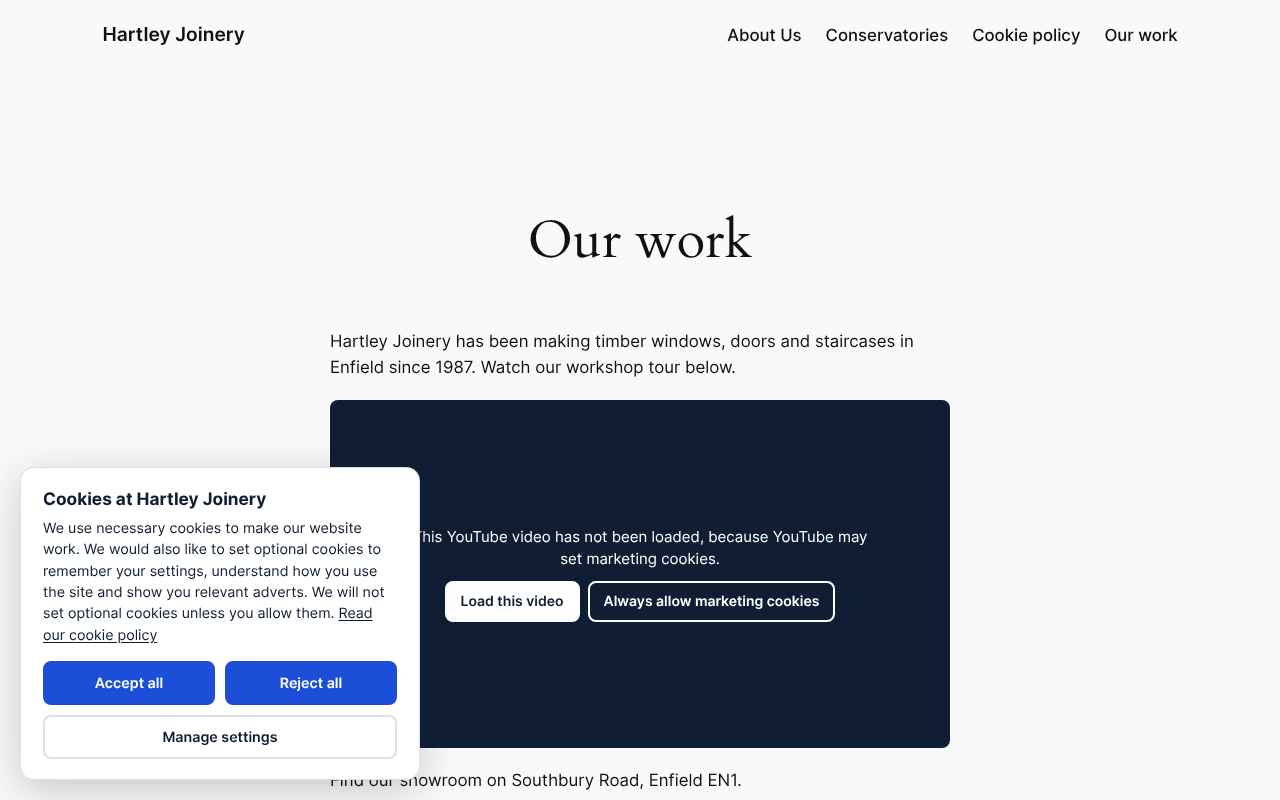
The banner gives visitors a fair choice, as the ICO expects. “Accept all” and “Reject all” look exactly the same and sit side by side on the first screen, and nothing is pre-ticked. A “Manage settings” panel lets them choose Functional, Analytics and Marketing cookies one by one, and a small cookie button lets them change their mind at any time.
It recognises Google Analytics 4, Google Tag Manager, Google Ads, the Meta Pixel, Hotjar, Microsoft Clarity, Microsoft Advertising, LinkedIn, TikTok, Pinterest and X wherever they come from: your theme, another plugin or code pasted years ago. You can also paste your own tracking codes into the plugin’s Analytics, Marketing or Functional boxes. YouTube, Vimeo and Google Maps embeds become a tidy click-to-load placeholder.
Google Consent Mode v2 is built in, so Google Ads and Analytics keep working properly for UK and EEA visitors. Every choice is saved in your own database as proof of consent (a random ID, the choices, the time, the policy version and a one-way hash of a shortened IP address), with automatic clean-up and a CSV export.
The cookie scanner visits your own pages and fills in your cookie table, and the [nr_cookie_policy] shortcode turns it into a plain-English UK cookie policy page. One click creates the page for you. When you add a new tracker, raise the policy version and everyone is asked again.
It is light (one small script, no jQuery, no outside service), works with page caching, uses your theme’s fonts and works well on phones and with a keyboard.
Made by Nomad Robin, with a plain-English “How to use” screen built in.
Key features
- Cookie banner that follows UK GDPR and PECR
- Accept all and Reject all buttons with equal prominence, as the ICO expects
- No pre-ticked boxes
- Manage settings panel with Necessary, Functional, Analytics and Marketing categories
- Three layouts: bottom bar, corner box or centre pop-up
- Your own wording, button labels and colours
- Uses your theme's fonts
- Small cookie button so visitors can change their mind at any time
- [nr_cookie_settings] shortcode and #nr-cookie-settings links to reopen the settings
- Blocks scripts until consent, wherever they come from
- Automatic blocking of Google Analytics 4 and Google Tag Manager
- Automatic blocking of Google Ads, AdSense and DoubleClick
- Automatic blocking of the Meta (Facebook) Pixel
- Automatic blocking of Hotjar and Microsoft Clarity
- Automatic blocking of Microsoft Advertising, LinkedIn, TikTok, Pinterest and X pixels
- Boxes for your own Functional, Analytics and Marketing scripts
- Click-to-load placeholders for YouTube, Vimeo and Google Maps
- Load a single video, or allow the category for all of them
- Google Consent Mode v2 (Basic, Advanced or Off)
- Ads data redaction and URL passthrough options
- Consent log stored in your own database
- Random consent ID, choices, time, policy version and hashed IP saved for each choice
- Automatic deletion of old consent records
- Consent log search, paging and CSV export
- Cookie scanner that visits your own pages, with no outside service
- Finds cookies set by your server and recognises known trackers, videos and maps
- Editable cookie table with categories, purposes and durations
- [nr_cookie_policy] shortcode with UK wording and a table of every cookie
- One-click "Create my cookie policy page"
- Policy version: ask every visitor again when your cookies change
- Optional Global Privacy Control support
- Withdrawing consent deletes common tracking cookies
- Accessible: keyboard friendly, focus kept in the panel, screen-reader labels
- Works with page caching
- Tiny script (about 10 KB), no jQuery
- Works on phones and tablets
- Dashboard with consent figures and a set-up checklist
- Keeps your data when uninstalled unless you choose otherwise
- Translation-ready
- Built-in "How to use" tab in plain English
- Version number shown on the plugin's screen
- One price: use it on as many sites as you like
Screenshots



Details and requirements
| Version | 1.0.0 |
|---|---|
| Last updated | 27 October 2026 |
| Download size | 71 KB |
| Licence | GPL v2 or later (code) |
Changelog
- 1.0.0 27 Oct 2026 — First release
Questions
How do I get the plugin after paying?
Straight away: there's a download button on the thank-you page, and you'll get an email with your personal download link and licence key.
How do updates work?
Your download link always gives you the latest release of version 1: fixes, security updates and small improvements are included. A future version 2 would be a separate purchase, and you never have to upgrade.
Can I use it on more than one site?
Yes. One price, and you can use it on as many sites as you like.
Is support included?
No. Help, set-up and customisation aren't included in the price. If something doesn't work as described, report it through the support page and I'll put it right. Your legal rights are not affected.
Can I get a refund?
Your legal rights apply if the product is faulty or not as described, and if it doesn't work as described and I can't fix it, I'll refund you. Because it's a download, the usual 14-day change-of-mind right ends once you start the download. Full details are in the Digital Products Terms.
Prices in pounds. I'm not VAT registered, so no VAT is added. Digital Products Terms